ANATOLY IVANOV / PROSE / 2010-03-30
GARMIN DAKOTA VS GARMIN OREGON GPS COMPARISON REVIEW
BACKPACKING / CLIMBING / CYCLING / GADGETS / RUNNING / TRANSPORTATION / TRAVEL / REVIEWS
Thinking about the ultimate outdoor navigation luxury? A rugged, handheld, mapping, routable GPS unit? Well, Garmin has been making them for years, offering a lot of choice and creating new products as often as possible. 2 months after I had published my extensive comparison of their bleeding edge Oregon and Colorado, Garmin introduced a new line of devices: Garmin Dakota 10 and Dakota 20.
In my previous article, I’ve selected the Garmin Oregon as the better tool, albeit with hefty drawbacks. Specifically, screen readability.
- Fortunately, Garmin has worked on the issues and the new Dakota solves most of the Oregon’s weaknesses.
- Unfortunately, Garmin has complicated matters by also introducing the Oregon 550 and, shortly afterwards, the Oregon 450. Which, because of their glossy screens and 3D compasses, are quite different products from the usability standpoint compared to the earlier Oregon 200, Oregon 300 and Oregon 400.
So, to give you a complete picture of the current situation, I’d have to carry and use 7 devices at the same time!
- Dakota 10
- Dakota 20
- Oregon 200
- Oregon 300
- Oregon 400
- Oregon 450
- Oregon 550
I think a compass is a must-have, especially for backpacking, so I’ve reduced the list to units with a compass:
- Dakota 20
- Oregon 300
- Oregon 400
- Oregon 450
- Oregon 550
The only difference between the Oregon 300 and the Oregon 400 is the preloaded maps. So I could use the Oregon 300 to describe both. The Oregon 450 is essentially the Oregon 550 without a camera. I had occasional access to the Oregon 550, so, in the end, the units I’ve actually held in my hands are:
- Dakota 20
- Oregon 300
- Oregon 550
To make it manageable, I’ve concentrated my attention on the Dakota 20 and the Oregon 300, with occasional reference to the Oregon 550.
Photo: Garmin Dakota 20 handheld in direct sunlight (no backlight)
Photo: Garmin Oregon 300 handheld in direct sunlight (no backlight)
And although the 2 units allow a very wide range of activities – driving, cycling, hiking, sailing, fishing, hunting, training, geocaching, weather trending, calculating, even waking you up and taking pictures – my focus is much more narrow.
DEFINE THE CONTEXT: NEEDS AND OPERATING CONDITIONS
When choosing a GPS unit, I’d suggest to first answer 2 questions:
- what problems does the device need to solve?
- in what conditions will the unit operate?
Ideally, a GPS receiver should solve your problems in the most effective and efficient way.
MY NEEDS AND OPERATING CONDITIONS
I’ve tested the Dakota and the Oregon in 3 contexts:
1 / Road cycling
- daily transportation
- training rides
- longer self-supported touring
- GPS as the only bike navigation system for:
- complicated city navigation in European capitals
- intercity navigation in Western Europe
- clear skies and direct sunlight
- cloudy skies
- night
- rain
- open spaces
- urban canyons
- temperatures from -5° C (20° F) to +35° C (95° F)
- opportunistic, omnivore battery power generation
2 / Hiking
- day hiking
- climbing approaches
- photography location scouting
- multi-day backpacking
- GPS as a map complement, navigation aid in difficult situations in the European “wilderness” areas:
- “humanized” forests’ trail maize
- white-outs and heavy snow
- off-trail
- night navigation
- clear skies and direct sunlight
- cloudy skies
- snow
- rain
- open spaces
- mountains
- dense forest
- temperatures from -30° C (-22° F) to +35° C (95° F)
- opportunistic, omnivore battery power generation
3 / Running
- long training runs over 15 km (9 mi) in unknown areas anywhere in the world
- GPS as the only navigation system for:
- complicated city navigation
- road running in the suburbia
- trail running
- clear skies and direct sunlight
- cloudy skies
- night
- rain
- sweaty hands
- open spaces
- urban canyons
- temperatures from -5° C (20° F) to +35° C (95° F)
- mains supplied power at homes, hotels, train stations and airports
So, how do the Dakota and the Oregon answer my precise needs and perform in these conditions?
FORM FACTOR
The Dakota is a puffy cutie. The Oregon is a clumsy overweight.
Photo: Garmin Oregon 300 (left) and Dakota 20 (right)
// Size
Do you remember the days of the Garmin Geko? Well, we’re finally going back there.
- Garmin has trimmed the bulk of the Oregon to create the smaller Dakota. A definite improvement. Even though it won’t fit in a trousers’ pocket like an iPhone, the Dakota disappears in a backpack’s belt pocket.
- The Oregon remains big and fat. An oversized soap.
Photo: Apple iPhone 3Gs (left), Garmin Oregon 300 (center) and Dakota 20 (right)
Photo: Apple iPhone 3Gs (left), Garmin Oregon 300 (center) and Dakota 20 (right)
Photo: Apple iPhone 3Gs (left), Garmin Oregon 300 (center) and Dakota 20 (right)
// Weight
The Dakota is 30% lighter than the Oregon. Still, both are far from anything feathery.
As measured on my electronic scale (1 g precision):
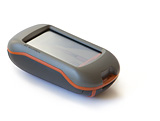 Garmin Dakota 20 |
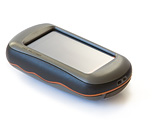 Garmin Oregon 300 |
|
|---|---|---|
| Empty: | 103 g (3.63 oz) | 146 g (5.15 oz) |
| With 2 AA rechargeable NiMH: |
164 g (5.78 oz) | 205 g (7.2 oz) |
// Build quality
- The Dakota feels like a tank: solid, no squeaks, rubber everywhere.
- The Oregon inspires less confidence. The battery cover of my Oregon 300 squeaked and moved 1 mm when pressed. Garmin has reassured me that it’s normal. The plastic cover contacts the rubber seal around the battery compartment. When compressed, the rubber gives in a little, but it does not compromise the unit’s IPX7 waterproofness. As an advantage, the cover is a bit easier to remove than on the Dakota: changing batteries is simpler.
Photo: Garmin Oregon 300 (left) and Dakota 20 (right)
I’ve dropped both units from about 1 m (3.28 ft) onto wooden floor. I’ve also ejected the Dakota from my bike handlebar mount to slide 5 m (16.4 ft) on polished concrete. No complaints.
// Weather resistance
According to Garmin, both the Dakota and the Oregon will drown but will remain alive for 30 minutes at a 1 meter depth, as per IEC 60529 IPX7 standard.
- I’ve ridden both units in torrential, sustained downpours, for hours, with puddles forming inside the screen frame. No problem.
- However, I haven’t checked the IPX7 compliancy of either unit in a bathtub.
What about low temps? LCD displays tend to slow down in subfreezing conditions. The lowest I could take the units was a mildly cold -15° C (5° F) in the Alps. No effect on performance.
// Handheld
- The Dakota merges with the palm of the hand like an ergonomic tool. It feels like a handle of a big power drill.
- The Oregon feels like an oversized soap, ready to slip out of control when you relax the grip.
Photo: Garmin Dakota 20 handheld in direct sunlight (no backlight)
Photo: Garmin Oregon 300 handheld in direct sunlight (no backlight)
I can hold each unit with just one hand and operate the functions with my thumb.
// Bike mounted
The Dakota and the Oregon share the same rail-mount. A Garmin plastic adapter attaches either to the handlebars (crosswise) or to the ahead stem (lengthwise) with 2 nylon zip-ties. A small rubber insert is supposed to keep the mount in place, but both units rotate downwards or sideways after a series of bumps, no matter how much I tighten the zip-ties.
Photo: Garmin bike mount compatible with Dakota and Oregon GPS on a Brompton
The solution, shared by Dominique BLACHON, is to:
- wrap the handlebars or the ahead stem with a layer of inner tube (cut to size)
- attach the Garmin mount over the wrap
As a result, both units stop rotating so much on the handlebars and barely budge on the ahead stem.
However, the slide-in and slide-out process remains cumbersome:
- attaching lacks a positive feel: I have to double-check the unit is held securely
- removal requires a fair amount of force to push down the retaining flap and release the unit (the reason I once ejected the Dakota)
The Dakota’s more compact form saves precious handlebar space.
Photo: Garmin Dakota 20 on ahead stem (drop handlebars) under low-angle sunlight (no backlight)
On my road bike with FSA Omega Compact 42 cm / 31,8 mm drops, I can fit:
- the Dakota (on a Ritchey Comp 90 mm / 6° / 31,8 mm ahead stem)
- a Sigma BC 1606L DTS Cadence wireless bike computer (left handlebar)
- a Busch & Müller Ixon IQ LED powerful intercity headlight (right handlebar)
- both hands on the top section (in thick winter gloves)
An impossible combination with the Oregon.
Photo: Garmin Oregon 300 on ahead stem (drop handlebars) under low-angle sunlight (no backlight)
// Running
Both units weigh more than a map and a thumb orienteering compass. However, if you want to focus on the fun of running rather than on the fun of orienteering at a 175 BPM heart rate…
- The Dakota’s low weight and low bulk is a clear benefit when holding the unit in sweaty hands for hours of hard running.
- The Oregon is way too bulky, at least for my standard hands. However, if you already run with water bottles in your hands, the weight might be OK for you.
USER INTERFACE
// Screen dimensions, resolution and color depth
The main, and crucial, difference between the Dakota and the Oregon is the screen dimension, resolution and color depth:
Garmin Dakota 10 / 20 |
Garmin Oregon 200 / 300 / 400 / 450 / 550 |
|
|---|---|---|
| Dimensions (physical): |
3,6 x 5,5 cm (1.43 x 2.15 in) 2.6 inch diagonal |
3,8 x 6,3 cm (1.53 x 2.55 in) 3 inch diagonal |
| Dimensions (pixels): |
160 x 240 px | 240 x 400 px |
| Resolution: (pixels per inch) |
111 PPI | 157 PPI |
| Color depth: | 65 000 colors | 65 000 colors |
In other words, the Dakota’s screen:
- is smaller in physical dimensions
- has lower resolution (lower pixel per inch count): you can easily see the pixel grid when the unit is switched off, as well as the pixels of the interface elements (typography, maps and pictures appear “grainy” and “pixelated”)
- appears coarse
- shifts the grays from neutral to yellowish
- darkens medium colors like shading relief or vegetation cover (light olive becomes dark green)
- looks like an outdated second-generation color cell phone
While the Oregon’s screen:
- is larger in physical dimensions
- has higher resolution (higher pixel per inch count) and millions of colors to provide detailed, smooth, full color imagery
- looks like your notebook computer or desktop LCD display: gorgeous and contemporary
For your reference, Garmin’s GPSMAP 60CSx display seems really antique compared to both the pretty Oregon and the utilitarian Dakota.
So, looks like the Oregon has the best display? Well, in a dark room with screen backlight switched to the max, yes. But things get more complicated outdoors.
// Screen technology
The Dakota and the Oregon use the transflective screen technology (with additional layers of resistive touchscreen on top):
- under brightly lit conditions, outside light – the sun – passes through the screen and bounces back to illuminate the pixels
- under moderately lit conditions or in the dark, inside light – a lamp behind the screen, the backlight – illuminates the pixels
Ideally the system works in such a way that instead of fighting strong illumination from the outside by even stronger illumination from the inside, the technology lets the outside light source do the work. The backlight, which requires a lot of electrical power, is switched off to preserve the batteries.
The differences between the units?
- Dakota 10 / 20 and Oregon 450 / 550 have high-gloss, plastic-mirror-like screen finish. While less reflective than the glass of the current MacBooks and iPhones, the new Garmin screens allow you to get a general idea of your make-up.
- Oregon 200 / 300 / 400 have a diffused, matte screen finish, similar to the old-school notebook computers and PDAs.
The gloss adds contrast to the picture, so readability improves about 10%, if you don’t mind the reflections.
The matte touchscreen of the Oregon 200 / 300 / 400 has an advantage: it’s less sticky. Fingers slide from point to point. The glossy screen of the Dakota 10 / 20 and the Oregon 450 / 550 tends to grip moist fingers, but not as badly as the iPhone’s screen.
// Screen performance
A bright, easy-to-read screen is crucial. What’s the use of a high-tech mapping GPS if you can’t see where you’re going?
But display readability is a combination of 2 factors:
- hardware (the screen assembly)
- software (the interface and map design)
So I’ll assume a nicely designed map – high contrast, simple shapes, restrained or switched off relief shading – to gauge the hardware performance:
- Fortunately, the Dakota’s screen is bright and easy-to-read in any lighting condition, except when viewing heavy shaded relief or dark colored vegetation cover.
- Unfortunately, the Oregon 200 / 300 / 400 screens are dim. As in “hard to see”.
- The Oregon 450 / 550 fare a bit better, but still lack the instant readability required for dependable navigation.
direct sunlight
By design, transflective technology works best in direct sunlight, so the Dakota is perfectly readable, while the Oregon is quite readable. All without backlight. But direct sunlight occurs either at noon, or when you tilt the unit towards the sun.
Photo: Garmin Oregon 300 (left) and Dakota 20 (right) under direct sunlight (no backlight)
indirect sunlight
If the sun isn’t shining directly on the screen at a 90° angle, as, for example, in the morning or in the evening due to sun angles, or on your handlebars:
- the Dakota 10 / 20 are instantly readable, although heavy relief shading looks black
- the Oregon 200 / 300 / 400 are simply dim
- the Oregon 450 / 550 are sub-optimal, but gloss does help
Photo: Garmin Oregon 300 (left) and Dakota 20 (right) under indirect sunlight (no backlight)
You can try to compensate the Oregon’s dimness by switching on the backlight. Unfortunately, it’s not powerful enough to counteract the well-lit outdoors. Backlight at 100% hardly makes a difference:
- In cycling mode, the light pink used to indicate anything off-road on the Oregon looks exactly like grey asphalt.
- In hiking mode, the problem is a bit less severe. You can tilt the Oregon this way and that way and find a point when it’s more readable. But it’s still nothing like instant and clear read-out.
Photo: Garmin Oregon 300 (left) and Dakota 20 (right) under indirect sunlight (no backlight)
clouded
Without backlight:
- the Dakota 10 / 20 remain easy to read
- the Oregon 200 / 300 / 400 are unusable
- the Oregon 450 / 550 are more readable because of the glossy screen, but barely over the tolerance threshold
With backlight:
- the Dakota 10 / 20 don’t show any difference
- the Oregon 200 / 300 / 400 / 450 / 550 become somewhat useable
But to become readable on a lightly overcast day, the Oregon requires its backlight to be set at about 80%. Essentially a flashlight fighting the sky: the batteries go fast.
night
No problem, great displays. If we’re talking navigation, of course. Because the Dakota is bad for watching photos back in camp.
At maximum setting, Dakota’s backlight is about 20% weaker than Oregon’s. However, it’s not a problem in my opinion.
Although both the Dakota and the Oregon lack a “night mode” used on most in-car GPS, including Garmin’s and TomTom’s, you can adjust the backlight to your liking and preserve a bit of night vision.
sunglasses
Everything above just gets worse.
However, the Dakota remains very readable. While with the Oregon you have to choose screen readability… or glare discomfort, UV damage and flies in the eyes.
// What’s the problem with Oregon’s screens? What’s the solution?
The smaller and lower resolution Garmin Dakota is very readable in the outdoors without any supplemental backlight. Shouldn’t the bigger, higher-resolution Garmin units be even better?
Unfortunately, no. The resolution is the root of the problem. Garmin faces the resolution vs luminosity dilemma:
- higher resolution screen = more pixels = lower transmittance = lower reflectivity = dimmer screen but better picture
In order to draw the beautiful images on the modern high-end screens of the Oregon, Garmin improves resolution. More pixels per square inch equals more optical definition, detail and subtler color gradation for the user interface, maps, compass, etc.
The screen holds a grid of pixels. Each pixel unit is like a window, a combination of a glass pane and a window frame. The “window frame” holds the pixel in place and transfers electrical current to the pixel. Light can pass only through the “glass panes”, but not through the “window frames”.
To achieve higher resolution, in other words, higher pixel density, each pixel needs to be smaller. The whole “window” gets tinier, there’s more “windows” in the screen, but the “window frame” density grows as well, decreasing the overall transparency of the system. Result: a dimmer screen.
The solutions would be to:
- make the pixels’ “window frames” super-micro-tiny
- make the pixels’ “window frames” transparent
- increase the backlight intensity to overpower the outside light
- decrease the resolution to enlarge the “glass panes”, sacrificing image quality
Solutions 1 and 2 would require some yet to be invented technology. Solution 3 would require either a more efficient backlight (such as LED) or much more powerful batteries. Of course, it’s possible to work on the 3 solutions at the same time.
But, for now, you’ll have to choose between either:
- high resolution (Oregon)
- OR
- high readability / visibility (Dakota)
And it’s not even a Garmin-only problem. Magellan faces the same challenge, as well as any manufacturer of electronic devices used outdoors.
Astonishingly, Garmin has made the right choice of a lower resolution screen in the new Dakota to obtain a readable device. A counterintuitive move, against all marketing hype and technical evolution. They’ve recognized that lower tech works better, at least for now. I applaud Garmin for such an honest self-assessment and corrective action.
// We forgot something: the ambient light sensor
Neither the Dakota nor the Oregon carries an ambient light sensor that would control the backlight! You have to manually press a button on the side and then adjust the backlight level.
Bearable when hiking. A pain when cycling.
Suppose you ride through the fields and the sun is shining. Great. But then you get under the trees, or, worse, into a tunnel. Reach out for the backlight button. Adjust. Then back into the fields. Adjust again. Or leave the backlight on. And drain the batteries in no time.
Bike lights have illumination sensors to automate the hassle of frequent adjustment. Even basic cell phones have ambient light sensors. The iPhone: of course. But not the Garmin’s high-end GPS.
// Touchscreen
Garmin uses the resistive touchscreen technology in the Dakota and the Oregon: 2 thin sheets of electrically conductive material separated by a thin space. When something or someone pushes from the top, the 2 layers touch together and the system registers a “mouse click” in that area of the screen.
The touchscreen requires simple pressure to work. So far, I’ve used the Dakota and the Oregon with my:
- fingers
- nails
- Assos winter cycling gloves
- Outdoor Research Omni gloves
- Versant Nord super warm, waterproof, 3 finger mittens
- pen tops
- Wacom stylus (both ends)
- backpack belt’s webbing ends
- actually, anything that can bring the 2 layers together
and in all weather conditions:
- under sustained rain
(literally with a puddle on the screen) - when snowing
- in sub-freezing temperatures
Very reliable, although not as precise as on the iPhone.
Despite screen size differences, the Dakota and the Oregon share similar graphic design to work with the touchscreen. All functions have large, dedicated icons, the same as on the Mac or on the iPhone. Additional features appear as needed: zoom buttons, back button, contextual menus, scroll buttons, input areas, etc.
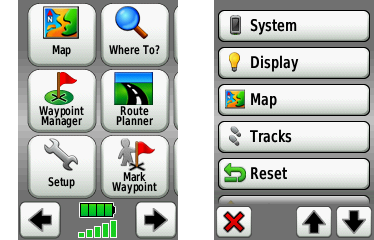
Screenshot: Garmin Dakota main menu (left) and setup menu (right)
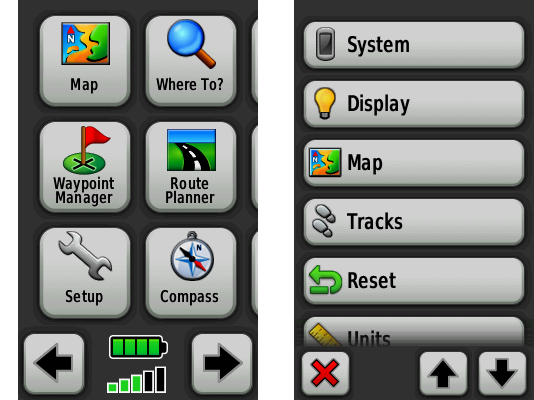
Screenshot: Garmin Oregon main menu (left) and setup menu (right)
The Dakota and the Oregon feel natural and intuitive:
- “click and drag” the map to see what’s ahead, or just check the course: feels like a “real” map, albeit seen through a tiny window, especially on the Dakota
- tap on the map to place a waypoint
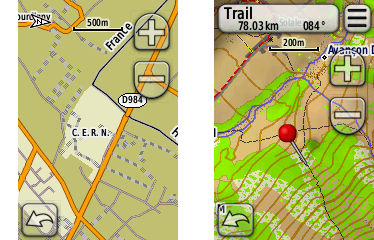
Screenshot: Garmin Dakota road map (left) and topographical map (right)
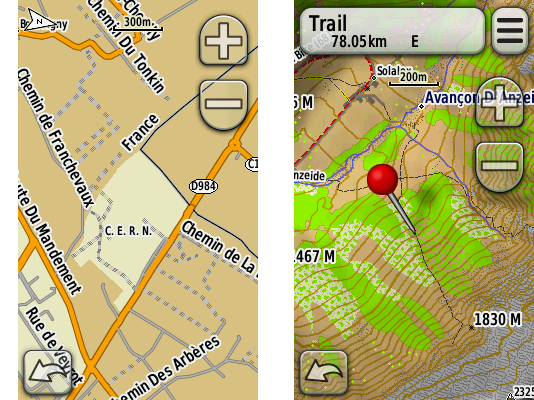
Screenshot: Garmin Oregon road map (left) and topographical map (right)
- type on a virtual keyboard: although Garmin uses an alphabetical layout instead of the standard QWERTY, it’s still quick to type in a name of a street
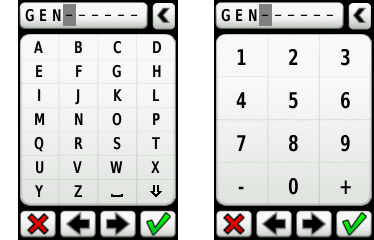
Screenshot: Garmin Dakota alphanumeric input methods
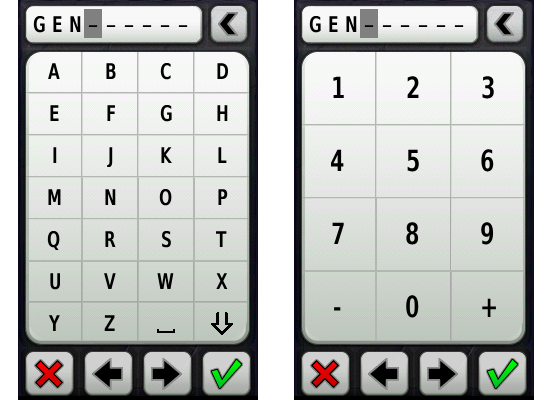
Screenshot: Garmin Oregon alphanumeric input methods
- navigate through the menus like on the iPhone
Well, it’s not as magical as on the iPhone. Both units annoy with their alphabetical keyboard layout, especially when compared to iPhone’s QWERTY landscape mode. Both drop frames during animations here and there. The map takes some time to redraw. And the design lacks a bit of Apple’s refinement.
Nonetheless, Dakota’s and Oregon’s interface is a real pleasure to use:
- hold the unit in your hand and quickly thumb through the options
- pan the map with a thumb while hiking
- tap through the menus to change the route while riding
- point with the index finger to tell the unit to get you there or add a waypoint
The interface allows for extreme precision when placing waypoints or choosing objects on the map:
- tap once in the area of interest (approximately)
- a pin appears
- “click and drag” the map with a finger
- the map moves, but the pin does not
- position the map precisely under the pin, zooming in if necessary
- check the readout from the pin and choose the options
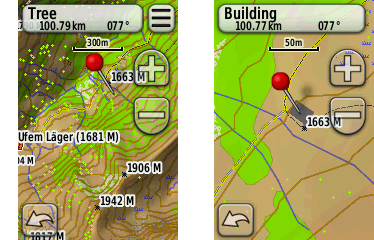
Screenshot: Garmin Dakota precise object selection on the map
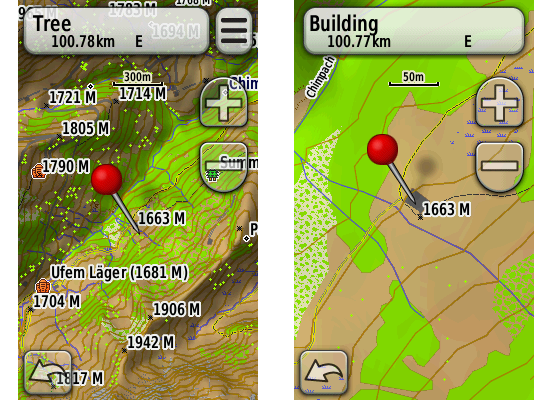
Screenshot: Garmin Oregon precise object selection on the map
OK, but how does the Dakota’s smaller screen accommodate the user interface?
- the Dakota shows the exact same amount of buttons and menus as the Oregon
- a lot of buttons manage to share the same size
- the Dakota and the Oregon use the same iType font engine by Monotype
But:
- the Dakota reduces spacing between buttons
- some buttons are scaled-down variants of the Oregon interface
- the Dakota plays with tighter letter-spacing, increases font size and adds bold variants, which, surprisingly, yields better readability when compared side-by-side with the Oregon
However, 2 factors make touchscreening more difficult on the Dakota:
- Garmin places an elevated frame around the screen to protect it. So, unlike with Apple’s iPhone, which has its screen flush with the surrounding body, you can’t place the thumb at the screen / frame border to control either the Dakota or the Oregon. A slightly thicker screen frame – 3,3 mm (0.13 in) for the Dakota compared to 2,9 mm (0.11 in) for the Oregon – gives a bit of advantage to the Oregon.
- Dakota’s smaller screen reduces the size of some graphic interface elements. Smaller buttons, arrows and icons – smaller margin for error when touching the screen. Typing or selecting at the screen’s edge is more difficult on the Dakota than on the Oregon. While you can pan the map toward the center to make things easier, there’s no way to make the keyboard bigger. With the Dakota, I tend to mistype the left column letters A, E, I, M, Q, U, Y, inadvertently choosing the next column’s letters.
So if you plan to type often, the Oregon may be a better choice.
But overall, once you’ve used either the Dakota’s or the Oregon’s touchscreen, there’s no going back to wheels and buttons. Same as with the iPhone.
// User-interface quirks
- In simulation mode (GPS reception off), the Dakota and the Oregon always suggest to simulate “driving” a route… No matter if I’ve chosen a bicycle or my feet as my transport. The heritage of the American driving culture, I guess…
- Waypoint names are limited to 30 characters! Less than a Twitter post. Amazing for a XXI century gadget. Even worse, the user-interface shows only the first 20 characters or so. And it can’t scroll a long name horizontally like the primitive Nokias. So if you have a lot of waypoints, you’ll have to resort to some coding system, using ISO country codes, for example.
- There’s no way to subdivide and classify waypoints into sub-folders or live filters. The Dakota 10 / 20 and the Oregon 200 / 300 / 400 are able to store 1 000 waypoints and 50 routes. The Oregon 450 / 550 expand the capacity to 2 000 waypoints and 200 routes. Now, imagine a list of 2 000 waypoints on a 3 inch screen… Yes, Garmin shows the closest waypoints first, and yes, you can search through, but what if you don’t remember the name?
- Neither the Dakota nor the Oregon provide orthographical approximation or spell-checking. Real-life example: downtown Geneva, Switzerland. I needed to navigate myself to “rue du Pré Jérôme”. Street name given over a cell phone, just before its battery died. No written reference. Should I type that as “Pres-Jerome”? “No results found”. “Pres Jerome” without a dash? “No results found”. Just “Jerome”? Nope. I finally had to search for a hospital that I knew was nearby, then pan the map around and locate the street visually.
- Both the Dakota and the Oregon don’t know how to insert and type! Overtype only. Ugh… I mean, even the most basic cell phone can do that!
// Screen durability
fingerprints
The matte screens of the Oregon 200 / 300 / 400 collect fingerprints, but not as much as the glossy screens of the Dakota 10 / 20 and Oregon 450 / 550.
scratches
The elevated frame around the screen helps. But if you take several additional precautions:
- place the units into pockets without sharp objects inside
(keys, climbing hardware, cooking gear, coins…) - keep the screen side towards the body
- protect the screen from branches when going through
- avoid rubbing sand or small debris into the screen when interacting with the unit
Then both the Dakota and the Oregon screens will remain relatively scratch-free.
If you do not plan to baby the unit like an expensive cell phone or a pro camera lens, then expect rapid screen deterioration. As with any tool.
POWER SUPPLY
Both the Dakota and the Oregon use 2 standard size AA batteries of any type:
- alkaline
- lithium
- rechargeable NiMH
Very smart. No proprietary battery packs like in the Garmin Edge 705. Or Apple iPhone.
Want to charge your batteries with a solar panel? A hub-dynamo? No problem. Want to swap the batteries with some other device? Here you go. Unplanned power shortage? Get a pair of AAs in any store, anywhere on the planet.
Whereas, a proprietary battery:
- isn’t widely available, so can’t be swapped for a fresh one easily
- will degrade one day and you’ll overpay the replacement
- might disappear from the market (planned obsolescence), making your GPS unit unusable
POWER USE (BATTERY LIFE)
Same batteries. Different screen sizes, different backlight outputs and thus, different power appetites.
- The Dakota runs at least 20% longer on the same batteries when all other things are equal (for example, backlight). In the real world, the Dakota requires less juice because its screen remains readable without backlight, most of the time.
- The Oregon gulps down batteries. A 2-hour, 205 km (127 mi) drive from Geneva to Goppenstein in Switzerland has exhausted 2 fresh alkaline AAs (3D in-car view with backlight set to max).
To squeeze more juice:
- switch to NiMH rechargeables (in my case, 2700 mAh by GP Batteries)
- choose the correct battery type in the unit’s setup (so that the software can estimate the remaining charge precisely)
- ration the backlight (but you may get to a point where you won’t see much on the Oregon’s screen)
- switch off the tracklog
Battery life:
- In cycling mode, for maximum efficiency (weight and bulk carried, distance and speed), you’ll need to forgo the paper maps and keep the GPS switched on. If you plan to tour with the Oregon, plan to recharge every night if you have access to AC power, or exchange for batteries charged on solar / hub-dynamo during the day. The Dakota will last a day of touring, a backlighted search for the campsite and the morning ride to the lunch restaurant. Well over 200 km (124 mi).
- In hiking mode, both the Dakota and the Oregon can last quite a while if you keep the devices switched off and use them only in challenging conditions that I’ve described in the beginning of this article (“humanized” forests’ trail maize, white-outs and heavy snow, off-trail, night navigation). Carrying and tracking a paper map for easy sections when hiking is more efficient than on the bike, because of the lower speed and shorter distance.
- In running mode, I guess you’d need to run a 2-day ultra to deplete the units’ power. I haven’t run an ultra with a GPS yet. The longest I’ve run with the Dakota was an improvised 20 km (12 mi).
MAPS
A GPS receiver is almost worthless without a map. Sure, it could still help in 2 cases:
- record your track and later help you follow this track back, for example, on a glacier to avoid the crevasses (use your brains and rope-up anyway!)
- report your position to the rescue teams
It’s the combination of a GPS receiver with a map that realizes the full potential of GPS navigation. In yester days, you would use a transparent GPS plotter to find your position on a paper map. Sometimes under pouring rain and raging wind. Nowadays, the exact same maps are available directly on the screen of the GPS receiver. Pure luxury, as long as you have juice in the batteries.
// Why should you worry about maps when choosing a GPS unit?
Problem is, maps are intellectual property, same as music or movies. And most of mapping data is proprietary, DRM-protected, often tied to a particular brand of GPS receivers.
It’s like with the FairPlay music bought from the iTunes Store before 2009. You could listen to these tracks only on the Apple’s iPod.
So, before you choose a GPS unit, consider the maps available for it. And as with the choice of a paper map, choose carefully. Bad maps can kill you.
// What is a vector or pixel map?
- A vector map uses mathematical equations that combine geometrical primitives (points, lines, curves, shapes or polygons) to represent forms and colors. You never see the pixels. Zoom in, zoom out: the image is rendered in real-time. Always crisp and beautiful.
- A pixel map, on the other hand, uses a bitmap, fixed representation. When you zoom in, you loose resolution, when you zoom out, you also loose precision and sharpness.
When choosing a digital map, prefer the vector variant.
// Cycling maps
Statistically, cycling over long distances or traveling with a folding bike to unknown cities is the domain of exceptional weirdos. Not a lucrative mass market. Result: no one makes cycling maps for GPS devices.
So, for urban navigation and intercity biking, we have to use maps made for cars. 2 companies dominate the road maps market:
- NAVTEQ, an American company (wholly-owned subsidiary of Nokia)
- Tele Atlas, a European company (wholly-owned subsidiary of TomTom)
TomTom manufacturers in-car GPS navigation devices, and thus, stands as Garmin’s direct competitor. As TomTom owns Tele Atlas, it won’t sell you a map to help you use a Garmin GPS. If you want a road map for a Garmin, you’ll have to buy NAVTEQ maps. Not much choice.
Unless you consider the OpenStreetMap as a dependable navigation tool, of course.
NAVTEQ / Garmin City Navigator Europe NT
I’ve been using the NAVTEQ’s map of European roads compiled into a proprietary Garmin format. The map covers:
- Albania (major roads only)
- Austria
- Belgium
- Bulgaria (partial coverage)
- Croatia (partial coverage)
- Czechia
- Denmark
- Estonia
- Finland
- France
- Germany
- Great Britain
- Greece
- Hungary
- Iceland
- Ireland
- Italy
- Latvia
- Lithuania
- Luxembourg
- Macedonia (major roads only)
- Moldova (major roads only)
- Netherlands
- Norway
- Poland
- Portugal
- Romania (partial coverage)
- Serbia & Montenegro (major roads only)
- Slovakia
- Slovenia
- Spain
- Sweden
- Switzerland and Liechtenstein
- Turkey (partial coverage)
- Ukraine (major roads only)
I’ve totaled about 3 500 km (2 175 mi) with this map in the Geneva, Vaud, Fribourg, Neuchâtel, Bern and Valais cantons of Switzerland; the Île-de-France (Paris agglomeration), Ain and Haute Savoie departments of France; as well as on the Canary Islands of Spain. Part of that mileage was done by car in Switzerland and France with a TomTom also onboard. I wasn’t driving. I was in the side seat, comparing the 2 systems.
- The City Navigator map has zero bike-specific information. Unlike France or Spain, Switzerland is a rather bike-friendly country, with thousands of kilometers of bike lanes and one-way streets open for two-way cycling. None of this is on the map.
- In general, I’ve found NAVTEQ / Garmin’s maps to be less up-to-date than Tele Atlas / TomTom’s. For example, on the Place des Nations, a major square in front of the United Nations in Geneva, NAVTEQ advises a left-turn where it’s forbidden by a sign and simply dangerous. I guess the mapmakers initial focus – USA for NAVTEQ / Garmin and Europe for Tele Atlas / TomTom – partially explains the differences in data quality.
- The NAVTEQ map display on the Dakota and the Oregon units, as well as in the Garmin RoadTrip and MapSource software, lacks any indication of one-way streets. No blue arrows like on the GoogleMaps provided by Tele Atlas. Oddly, NAVTEQ maps do contain information about one-way streets and Garmin’s routing engine does take one-way streets into account. They just lack any visual clue. It’s an inconvenience in Switzerland where most streets are two-way, a huge pain in Paris where most streets are one-way and a major hassle on the Canary Islands where a navigation detour means a lot of hard climbing.
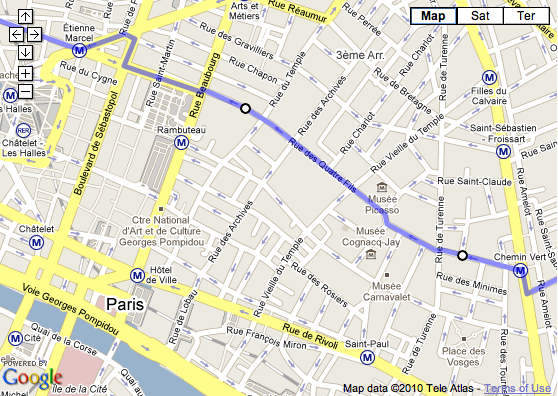
Screenshot of Paris Marais district in GoogleMaps
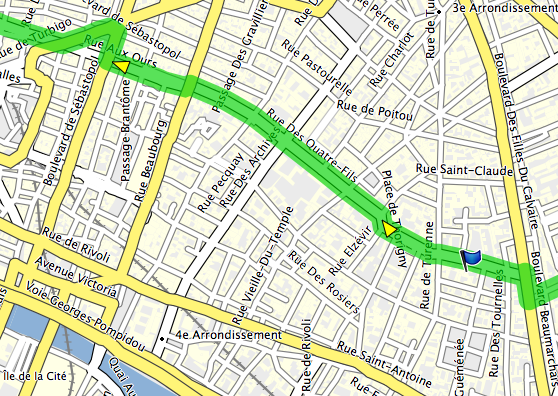
Screenshot of Paris Marais district in Garmin RoadTrip
- The POI (Point of Interest) database is fairly up-to-date for Switzerland and France and has helped me find a place to eat on several occasions. It’s totally inadequate for the Canary Islands, lacking even the largest shopping malls.
But the main advantage of NAVTEQ’s map easily outweighs its drawbacks. The entire European road network, with even the tiniest streets, all wraped in a very compact package… It’s so liberating! The digital map saves weight, bulk and time:
- no need for a backpack or panniers just to carry tons of paper
- no need to correlate the real world to the map and keep track of turns
- no need to carry a separate list of restaurants, lodging and shops
You can go cycling in any direction, for as long as you wish, and never get lost. Unless your batteries are dead, of course.
// Hiking and backpacking maps
For backcountry travel, a detailed (1:25 000 cm) topographical map allows you to move faster, easier and safer.
Generally, such maps are made by government organizations and either sold or sometimes made available for free. The mapmakers, not the end-users, choose the digital format and compatibility, so, before you buy a GPS unit, check if the country you’re heading to makes maps that work with it.
In Europe, that means checking for each country, as there’s no centralized European Union cartographic organization. Yet. If you live in the USA, that’d be like checking whether the State of California supports Garmin GPS units. And then finding out if the State of Nevada does as well.
Topo Swiss v2
The Topo Swiss v2 is a digital vector map developed by the Swiss Topo, the cartographic agency of the Swiss Confederation.
They have been making gorgeous paper maps for more than a century. Their 1:25 000 maps are the most accurate and detailed topographic representations of Switzerland used by hikers, climbers and of course, the military.
The Topo Swiss v2 map is compiled for Garmin devices. It combines data from 1:25 000 cm and 1:50 000 cm cartography, in vector form, and includes tons of information:
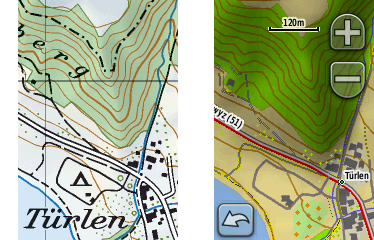
Photo of paper map (left) compared to Garmin Dakota screenshot of digital map (right)
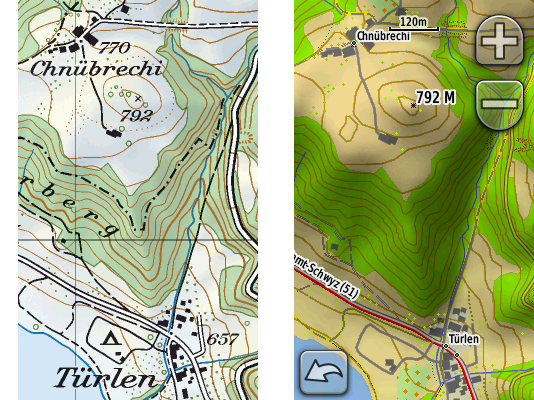
Photo of paper map (left) compared to Garmin Oregon screenshot of digital map (right)
- complete and detailed road and trail network:
- highways (divided lanes)
- junctions
- rest areas
- parkings
- 2nd class highways (undivided lanes)
- trunk roads
- 1st class roads (at least 6 m wide)
- 2nd class roads (at least 4 m wide)
- suburban roads (at least 4 m wide)
- 3rd class roads (at least 2,8 m wide)
- 4th class narrow roads (at least 1,8 m wide)
- 5th class paths, trails and bicycle paths
- 6th class footpaths
- traces (!)
- mountain passes
- bridges
- underpasses and overpasses
- tank roads (!)
- traces of historic roads
- airports, airfields and grass strips
- ferries
- complete and detailed rail network:
- railway tracks (normal gauge, narrow gauge, rack, cable)
- railway stations and stops
- platforms
- freight or nostalgic railways
- railways out of service
- intercommunal tramways
- industrial tracks
- tunnels
- aerial cable ways
- chairlifts
- goods lifts
- skilifts
- boundaries:
- national boundaries with numbered markers
- cantonal boundaries with markers
- district boundaries with markers
- municipal boundaries with markers
- boundaries of The Swiss National Park or protected areas
- individual features:
- houses
- remote inns
- alpine huts (!)
- towers
- ruins
- greenhouses
- storage tanks
- allotments (gardens)
- monuments
- churches
- chapels
- cemeteries
- shrines
- crosses
- cooling towers
- wind power stations
- chimney-stacks
- castles
- lookout towers
- radio transmitters
- large and small antennas
- camp sites
- walls
- avalanche barricades
- caves
- erratic blocs
- detailed topography:
- contour lines (with various colors for ground, scree / shingle, ice / lake)
- trigonometric points
- spot heights
- mountain peaks
- lake levels
- spot heights at lake bottom
- terrain (relief) shading
- small depressions
- dolines
- escarpments
- stones
- cuttings
- embankments
- ground slips
- gravel pits
- clay pits
- quarries
- rocks
- scree
- glaciers
- moraines
- detailed vegetation:
- forests with defined outlines
- forests with undefined outlines
- scattered forests
- isolated trees / groups of trees (!)
- scrubs
- hedges
- orchards
- tree nurseries
- vineyards
- detailed hydrography:
- springs
- streams
- waterfalls
- dry gullies
- stream weirs
- rivers, backwater
- river weirs
- marshes
- peat cuttings
- lakes
- ports, quays and piers
- dams
- maximum flood levels
- lakes with varying water levels
- overground and underground pipelines
- ponds
- fountains
- wells (!)
- reservoirs (!)
- water towers
- detailed and differentiated representations of settled areas (down to a building shape precision)
Plus, the digital map includes information not present on the 1:25 000 paper maps:
- complete official network of the Swiss marked (blazed) trails network (huge!)
- country-wide SwitzerlandMobility marked routes (to cross the whole country)
- POI (Points Of Interest) like hotels, restaurants, Post Offices, etc. by Tele Atlas (!)
- routing on roads and trails (read further for details)
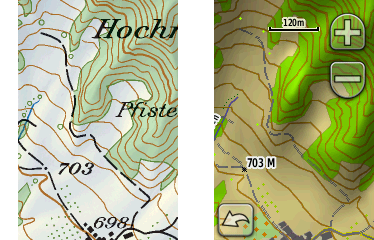
Photo of paper map (left) compared to Garmin Dakota screenshot of digital map (right)
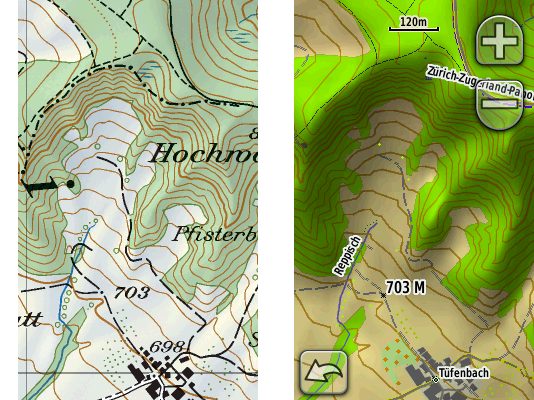
Photo of paper map (left) compared to Garmin Oregon screenshot of digital map (right)
The map’s detail is stunning. An amazing work of graphic design.
I’ve been using the paper versions of the map for years and its accuracy and minutiae have always impressed me. The digital vector map goes even further, as you can zoom in beyond what you could do with a loupe and yet maintain sharp object display.
However, sometimes the amount of information can become overwhelming, especially on the smaller screen of the Dakota. To improve the readability of any topographical map, adjust the settings of your device:
- reduce the level of detailing: “Setup > Map > Advanced Map Setup > Detail > Less / Least”
- switch off relief shading: “Setup > Map > Advanced Map Setup > Shaded Relief > Do Not Show”
// Watch out for the difference between maps on SD cards, maps downloads and maps on DVDs / CDs!
The Topo Swiss v2 is sold on a CD.
But the NAVTEQ / Garmin City Navigator Europe is available in 3 forms:
- precompiled on an SD card
- precompiled download from Garmin’s web site
- uncompiled on a DVD / CD
All cost the same, but, consider the differences!
SD card map:
- the SD card is included for “free”
- insert the card into the GPS unit and use the map right away: plug-and-play
- it is absolutely impossible to download the map from the GPS unit or from an SD card reader to your computer, Mac or PC, to see the map in Garmin RoadTrip, Garmin BaseCamp or Garmin MapSource software: you won’t be able to create or edit routes or waypoints on your Mac or PC
- you can’t buy a reduced price map updates if you’ve bought an SD card map – you’ll have to pay full price for a new SD card map containing the latest map data
map download:
- you have to get your own SD card if there’s not enough internal “disk space” on your GPS unit: for example, the complete NAVTEQ / Garmin City Navigator Europe takes approximately 1,6 gigabytes (Dakota 10 / 20 and Oregon 200 / 300 / 400 have 850 megabytes of internal memory)
- as in the case of SD card maps, it’s impossible to download the map from the GPS unit or from an SD card reader to your computer, Mac or PC, to see the map in Garmin RoadTrip, Garmin BaseCamp or Garmin MapSource software
DVD / CD map:
- you have to get your own SD card if there’s not enough internal “disk space” on your GPS unit
- you have to compile the map on your Mac / PC in order to upload it to the GPS unit: a lengthy and convoluted process, especially on the Mac (see below)
- you can see the map on your Mac / PC, create and edit routes and waypoints in Garmin RoadTrip, Garmin BaseCamp or Garmin MapSource
Honestly, the only reason I can find for you to buy an SD card or download version of a map is if you don’t have a Mac or PC. SD cards are cheap and the power to create and edit stuff on your computer is priceless. Buy the DVD / CD versions!
ROUTING
// What is routing and why it’s a trade secret?
The ultimate navigation aid, routing allows you to select the point of departure, then the point of arrival, and let the GPS unit:
- select the most appropriate route (shortest duration, shortest distance, scenic route, etc.)
- show you the route
- guide you through the route by telling you when to turn or head straight
Routing requires:
- a routing engine (software) inside the GPS unit
- a routing capable map (a map that describes its features like roads and trails in such a way that a routing engine can use it to calculate the optimal route)
A routing engine involves a huge number of parameters and algorithms: a lot of math and logic.
Each GPS manufacturer tries to build a better routing engine to differentiate itself from the competition. The result – a piece of proprietary software – is kept secret. So neither Garmin nor TomTom will discuss the details of route selection.
Maybe a good thing for the GPS manufacturers. Not so good for us, end-users, as we have to reverse-engineer the logic behind the few options available in the GPS setup and the routing engine’s real-world performance.
// Garmin’s routing engine
Garmin says they do their best to keep the routing engines of their current GPS units as similar as possible. My personal experience with the Dakota and the Oregon confirms that: both are identical when it comes to routing.
The units’ Setup menu provides several ways to control the routing:
transportation type:
- car
- bicycle
- on foot
The car mode is Garmin’s main mode. Most people that can buy a GPS receiver use cars to move around, right?
So, from a market share viewpoint, it makes sense to first develop a routing engine for car navigation. The GPS-buying cyclists and pedestrians… Well, as I’ve said already, we are a minority in the real world, and we are a minority in the GPS world as well.
As I understand it, the bicycle and pedestrian modes build upon the car mode with maybe some differences and adjustments that Garmin prefers to keep to itself. I haven’t found major differences. According to Garmin, “no elevation data is currently considered in bicycle routing”. I’d extrapolate that to the pedestrian mode as well.
For now, whether you’re on a bike or on foot, you’re still a car in Garmin world. You can’t ride against traffic on one-way streets open for two-way bicycle traffic or use bridges closed to cars. But you can walk (run?) on toll-roads and highways, no problem. Just remember to adjust the avoidance settings below.
avoidance setup:
- u-turns
- Bicycle: anytime. Well, almost. I generally ignore Garmin’s “make a u-turn when possible” suggestions because I know an even easier solution will present itself for a cyclist. But I regret not following this advice once, when missing the last turn before going downhill at 65 km/h (40 mi/h) into a classic suburban cul-de-sac.
- Pedestrian: you bet!
- toll-roads
- Bicycle: not an option, at least in Western Europe.
- Pedestrian: only if you run and hop over fences real fast so the cops can’t get you if you don’t get hit by a car. Avoid.
- highways
- Bicycle: surprisingly, I ride my bike on what NAVTEQ / Garmin considers “highways”. If you avoid these, sure, you’ll ride on some beautiful backcountry roads but you may add at least half an hour to your ride. Also, a lot of Swiss “highways” feature semi-segregated bike lanes. Bring it on!
- Pedestrian: avoid? I can walk on the side if I want to, but I do like silence.
- unpaved roads
- Bicycle: Perfect for a mountain bike. OK for a “normal” bike with multi-function tires such as the Schwalbe Marathons. Not a good idea for a road bike on slicks. Or a folding Brompton.
- Pedestrian: that’s where we’re going.
- carpool lanes
- Bicycle: never seen these “carpool lanes” in Europe. I ride in the bus lanes. Great fun!
- Pedestrian: avoid.
guidance method:
- on road for time
- Bicycle: choose this one if you ride a road bike. I’ve determined experimentally that this mode tends to choose the “normal” asphalt roads, at least in Switzerland, France and Spain. Just remember that Garmin doesn’t care if you like climbing or not. Garmin considers you a Tour de France rider. No panniers. Unlimited muscle power. Cheers, food and water in the car that follows behind. On the Tenerife island in Spain, where all roads go either up or down, the Dakota brought me onto super steep roads where I struggled out of the saddle while in my lowest 30.4 in gear. And the Garmin’s “shortcuts” would go on for 5 km (3 mi) or more!
- Pedestrian: Garmin will recommend to climb up and down a hill just to walk on a highway. Skip.
- on road for distance
- Bicycle: again, by trial and error, I’ve determined that this methods pulls me onto roads used by the local farmers: rarely maintained, huge number of potholes, horse and cow fecal matter. Might be OK if you ride a mountain bike.
- Pedestrian: this is the method to choose. Go the shortest route.
- off-road
- Off-road is the weirdest routing method I’ve ever seen. It means: straight line. Go man, go! A building? Go through. A lake? Swim buddy! A forest? Machete, machete!
- Don’t use it. It’s useless. Use your brains instead.
// The special case of routing for cycling in Paris
I’ve tested the Dakota in Paris and its suburbs. Poor fellow tried its best to navigate the madness…
- Most of the time, I couldn’t even take a look at the screen: so much is going on in this city. Better be lost but intact. Try going from boulevard Richard Lenoir through Bastille to rue du Faubourg Saint-Antoine to Nation and then back through boulevard Voltaire. In the evening rush hour. Going minimum 35 km/h (22 mi/h). In the winter darkness.
- Most routes proposed by the Dakota in Paris are simply ridiculous. The device knows nothing of the dangerous spots, the bus lanes, the streets’ width, the average traffic speed and the bike-only shortcuts.
- Because of the absence of one-way street indicators, neither Garmin’s Mac / PC software nor the map on the device allow to select a safe, optimal route through the Parisian maze. I have always been using GoogleMaps for routing through lesser-known parts of Paris, and while testing the Dakota, I’ve ended up having RoadTrip open alongside GoogleMaps just to copy the waypoints.
- Once an optimal route is uploaded to the device, navigating is a lot simpler with a GPS than with a map, especially in the Paris suburbs.
// The special case of routing for cycling on the Canary Islands
The Canary Islands, especially Tenerife, is a hostile place for a road / city bike. The car and the bus shape the islands’ infrastructure, just like in the US. Of all the times I’ve been there, I’ve seen at most 2 commuting “utility” cyclists. Only tough “sport” riders in Spandex brave the shoulderless roads, tourist drivers, zapping locals, 2 000 m (6 560 ft) elevation gains, unmaintained portions and the lack of road signs…
Despite sending me climbing steep village roads more often than I’d like, the Dakota literally saved my life on numerous occasions when navigating around the dreadful TF-1 Autopista del Sur toll highway. You see, they use the same interchange ramps to get you onto the highway, as well as onto the unnamed, unmarked, little-used auxiliary roads running parallel (the only way to cycle the island along the coast).
So, when you’re blasting along cars accelerating in their 3rd gear to reach the 100 km/h (62 mi/h) entry speed and the only thing you see is the highway 50 m (164 ft) away… you have to trust Garmin and NAVTEQ for making the right choice 5 m (16 ft) before the death lanes. And it works! With repeatable results.
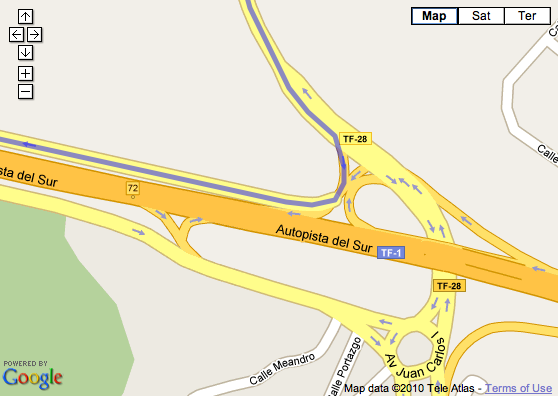
Screenshot of Autopista del Sur of the Tenerife island in GoogleMaps
// The special case of driving on trails or how to route with Topo Swiss v2
The amazing feature of the Topo Swiss v2 is its ability to route on trails. The Garmin routing engine thinks we’re driving, slowly, on some road, while, in reality, we’re hiking on a path. The Dakota and the Oregon will reassure you with indications like “NE on trail”, and even tell you when to take the next turn. Very cool.
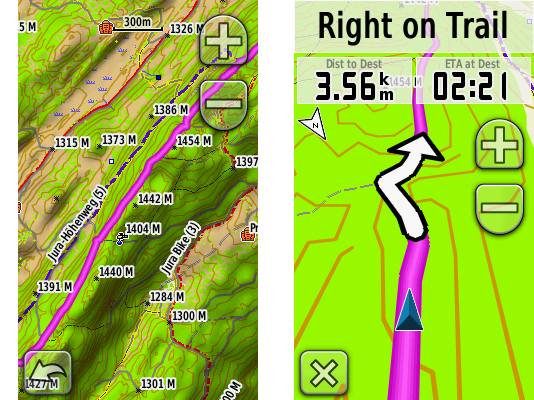
Screenshot (Garmin Oregon): route over the Jura ridge (left) with routing directions on the trail (right)
// Routing quirks and bugs
- The Oregon 300 fails to route over great distances. Not enough processing power.
- Example: I want to ride from where I am, in Geneva, Switzerland, to Paris, France. 550 km (342 mi). Satellites acquired, weather great. Please, get me there. No way, man: “Route calculation error: not enough memory available”. Does not compute on this device, while the Dakota, as well as Garmin’s RoadTrip / MapSource on the Mac / PC calculate the route just fine.
- Both units fail to draw the screen as quick as the incoming GPS and compass data.
- Example: On high-speed roundabouts, the map reorients a bit too late. Was that the 2nd turn? Am I going out at the right exit? I’d like to eliminate the guesswork. Especially on the heavy traffic, 2-lane roundabouts.
COMPASS
A compass is very helpful when:
- you move too slowly to calculate your direction just from the change of coordinates (under about 3 km/h (1.8 mi/h))
- you stand still and turn around to check the heading on the map with what you actually see
Garmin either omits or includes different types of compasses in the Dakota and the Oregon models:
- no compass: Dakota 10, Oregon 200
- 2D electronic compass: Oregon 300, Oregon 400
- 3D electronic compass: Dakota 20, Oregon 450, Oregon 550
A 2D compass requires you to hold the GPS unit parallel to the ground, similar to an old-school, analogue compass. A 3D compass works no matter how you hold it. Much more user-friendly.
My advice: get a device with a 3-axis compass. You’ll be glad you did.
ALTIMETER / BAROMETER
Personally, I rarely use either the barometer or the altimeter on a GPS device:
- When hiking in the mountains, I switch to my Suunto t6 wrist computer to keep an eye on ascent and descent speeds and intersect my position with the paper map’s contour lines.
- I also prefer local weather forecasts to nightly barometer pressure trending.
But it’s nice to have a backup just in case.
As with the compass, Garmin omits or includes the barometer / altimeter depending on the model:
- no barometric altimeter: Dakota 10, Oregon 200
- barometric altimeter: Dakota 20, Oregon 300, Oregon 400, Oregon 450, Oregon 550
GPS SIGNAL RECEPTION: ACCURACY AND SPEED OF ACQUISITION
// Antennas
Both the Dakota and the Oregon have no protruding antennas. Instead, they use a variant of the ceramic patch antenna that wraps around the body’s internals, like in most cell phones of the last 10 years. Also following the mobile technology trends, the units lack a connection port for an external antenna.
// GPS signal processing
Because radio signals from the GPS satellites are very weak when they reach the GPS receiver, the quality of signal processing is very important to filter out the noise and calculate a correct position, quickly. Signal processing occurs both at the hardware and software levels in the GPS receiver.
- Both the Dakota and the Oregon use contemporary, high sensitivity GPS microcontroller chips that apply extensive digital signal processing and complex quantum field’s correlation functions to acquire a satellite fix despite heavily attenuated GPS signals. In other words, both units manage to compute their positions in urban canyons and under heavy foliage despite the smallish receiving antennas.
- Both units benefit from the HotFix software. Basically, it’s a cache of the possible GPS satellite orbital positions (the ephemeris) for the next 3 days, at your current location. Unlike geostationary satellites, GPS satellites move in relation to a fixed point on the Earth surface. Each satellite flies around the Earth twice a day. Because the satellite constellation keeps moving even though you keep still, the GPS receiver needs to constantly adjust to the changes. The pre-computed GPS satellites’ positions can speed up the process of finding the satellites the next time you power on your GPS receiver. Of course, the HotFix system fails if you move over a considerable distance with the GPS unit switched off.

Animation: the GPS satellites’ constellation moves around the Earth (author: El Pak)
// Real-life performance
- The Dakota 20 gets a satellite fix faster than the Oregon 300. The Dakota also tends to receive more satellites in challenging conditions. For example, it keeps the GPS signal indoors farther from the openings to the sky, compared to the Oregon.
- In the city, the Oregon has a hard time acquiring a satellite fix when switching it on and immediately riding away. I’ve ridden 3 km (2 mi) with the unit still displaying the “acquiring satellites” message.
MAPS, WAYPOINTS, ROUTES AND FIRMWARE MANAGEMENT ON THE MAC / PC
A GPS management software on the Mac / PC maximizes the potential of the unit. It allows you to use the power and ergonomics of a “normal” computer (large screen, full-size keyboard, mouse or tablet) to:
- view your maps
- create, edit and transfer waypoints, routes and tracks from and to your GPS unit
- search for points of interest (POI)
- add custom points of interest
- import navigation data from other sources, like GoogleMaps
- update your unit’s firmware
// Maps, waypoints and routes management
Garmin provides 2 programs for each platform, Mac and Windows, to manage your maps, waypoints, routes and tracks:
Mac OS:
- BaseCamp: management of topographical maps containing digital elevation model (DEM) data only
- RoadTrip: management of road and topographical maps
Windows
- BaseCamp: management of topographical maps containing digital elevation model (DEM) data only
- MapSource: management of road and topographical maps
I have no idea why Garmin develops and supports 4 different, but very similar programs. I want one program for all my waypoints, routes and maps!
MapSource for Windows has been available for years, and, from my experience, provides a solid, extensive and efficient toolset.
RoadTrip for Mac became available only in September 2008, while BaseCamp for Mac appeared even later, in July 2009. Despite their young age, the 2 combined offer an almost 90% feature parity with MapSource and BaseCamp on Windows.
- Fortunately, the user interfaces differ to conform to the general Mac OS and Windows look and feel.
- Unfortunately, RoadTrip on the Mac lacks some of MapSource features:
- It refuses to download any waypoints or routes from the Dakota, which is a real pain. Keeps showing me “The selected device has no waypoints or routes on it” message. So I have to download stuff via BaseCamp on Mac or MapSource on Windows, export it as .gpx and import it into RoadTrip.
- It is currently unable to route on trails, edit tracks, draw shaded reliefs or build elevation profiles for routes. You have to switch to BaseCamp for all that.
- It has no distance / bearing tool.
All Garmin programs share the same awkwardness: no simple synchronization. Nothing like the iPhone / iPod synchronization with iTunes.
- If you create a waypoint on the GPS device with an auto-generated name like “Road 001”, then download that waypoint to your Mac / PC, then rename the auto-generated name in RoadTrip / BaseCamp / MapSource to something meaningful like “Bench with a view”, then upload it to the GPS device, the old “Road 001” will still remain on the unit. A duplicate. You’ll have to manually delete it from the GPS receiver. And that’s exactly 4 clicks once you get inside the “Waypoint manager” menu. Per waypoint. So if you have a bunch of duplicate waypoints, the process becomes a hassle. No, you can’t delete waypoints selectively en masse.
// The special case of Mac OS and maps “Made for Windows and Garmin MapSource”
Fortunately, the newest maps from Garmin, such as the NAVTEQ City Navigator Europe, install on the Mac just fine. Straightforward, out of the box.
Unfortunately, most non-Garmin maps, precisely, the topographical maps of Europe, are officially made only for the Garmin’s MapSource on Windows. Usually, they use an oh so Windowsy installer, so you can’t just drag and drop an open-standard file somewhere.
So, what if you want that awesome Topo Swiss v2 on your Mac? There is a solution. Follow the convoluted procedure:
- install the map on a Windows machine (either virtual or real)
- unlock it on Windows via the not so easy-to-use, special plug-in required, web-based process
- install the Garmin MapConverter software on the Windows machine
- convert the unlocked PC map in the MapConverter
- save the converted map somewhere a Mac can access (virtual folder, USB drive, network volume…)
- install Garmin MapManager on your Mac
- open the converted map in MapManager
- MapManager installs the map into RoadTrip and BaseCamp
As easy as 1, 2, 3… 8! But doable. Normally, any map made to work with Garmin MapSource on Windows should work with Garmin RoadTrip (or BaseCamp if the map has elevation data) on Mac OS.
// GPS firmware management
Firmware is the software that runs your GPS unit, its operating system, like Mac OS or Windows. Keep it up-to-date for best performance.
On the Mac OS, Garmin provides an easy to use Garmin WebUpdater to update the firmware of your unit. On Windows, MapSource performs this role. Hook up the Dakota or the Oregon via USB, make sure you’re connected to the internet and the software will check that you have the latest and greatest from Garmin. Rather neat!
However, it turns out WebUpdater does not install “beta” software. Uh oh!
So when Garmin tech support tells me I need to install the “Beta Software 2.95” in order to be able to select restaurants by their cuisine on the Oregon… Well, I have to manually download the “convenient” self-expanding Zip package (.exe), unpack it on Windows, then copy the needed file over to the GPS unit, then reboot the GPS. Halleluiah! I no longer have to ride to a restaurant to find out if they do veggies!
I suspect that either Garmin’s quality assurance department is entirely focused on FAA certification of its aircraft systems, or its development team has embraced the perpetual beta paradigm.
So let me rewrite that statement. If you want the latest and greatest from Garmin, like POI subcategories, manually install the latest beta software. At your own risk, of course.
TRAINING FEATURES
In theory, the Dakota 20 and Oregon 300 / 400 / 550 can connect to all ANT+ heart rate belts and cadence sensors. In practice, that means Garmin’s products, because neither Polar nor Suunto make ANT+ devices. The Finns use an older version of ANT (without the +) for their systems that’s incompatible with the newer one. As an owner of a Suunto t6, I can either forget EPOC analysis and switch to Garmin, or suffer crowded handlebars and devices overload.
Moreover, both the Dakota and the Oregon ignore power meters. Unlike Garmin’s cycling specific units, the Edge 500 (no mapping) and the Edge 705 (mapping without car view). Frustration induced by marketing.
SPECIFICATIONS
Before I get to the conclusions and alternatives, compare the specs of the units I’ve reviewed:
Garmin Dakota 20 |
Garmin Oregon 300 |
|
|---|---|---|
| Dimensions: (width x height x depth) |
5,3 x 10 x 3,3 cm (2.1 x 3.9 x 1.3 in) |
146 g (5.15 oz) (2.3 x 4.4 x 1.4 in) |
| Weight empty: | 103 g (3.63 oz) | 146 g (5.15 oz) |
| Weight with 2 AA rechargeable NiMH: |
164 g (5.78 oz) | 205 g (7.2 oz) |
| Display size (physical): |
3,6 x 5,5 cm (1.43 x 2.15 in) 2.6 inch diagonal |
3,8 x 6,3 cm (1.53 x 2.55 in) 3 inch diagonal |
| Display size (pixels): |
160 x 240 px | 240 x 400 px |
| Display resolution: (pixels per inch) |
111 PPI | 157 PPI |
| Display color depth: | 65 000 colors | 65 000 colors |
| Display technology: | transflective LCD with backight | transflective LCD with backight |
| Display finish: | glossy | matte |
| User interface: | resistive touchscreen | resistive touchscreen |
| Waterproof: | yes (IPX7) | yes (IPX7) |
| Bike mount: | yes | yes |
| Built-in memory: | 850 Mb | 850 Mb |
| Data cards: | micro SD | micro SD |
| Max number of waypoints: | 1 000 | 1 000 |
| Max number of routes: | 50 | 50 |
| Turn by turn routing: | yes | yes |
| Compass: | yes, 3D | yes, 2D |
| Barometric altimeter: | yes | yes |
| European road maps: | yes | yes |
| European topographic maps at 1:25 000: | yes | yes |
| Computer interface: | USB 1 | USB 1 |
| Mac OS support: | yes | yes |
| Windows support: | yes | yes |
For detailed feature comparisons of the Dakota 10 and the Oregon 200 / 400 / 450 / 550, take a look at Garmin’s web site. Select several units, then click the “compare” button. Just remember that you’ll be looking at manufacturer’s data.
VERDICT
- Garmin Dakota or Garmin Oregon? Except when viewing shaded relief or dark colored vegetation cover, you’ll be able to easily read the Dakota’s screen in any lighting condition. Mostly without backlight, saving battery power. You’ll appreciate its better ergonomics: more compact and lower weight. Although perfectible, the Garmin Dakota 20, with its 3-axis compass, is currently the best GPS mapping device available, in my opinion. Even if it was twice as expensive as the Garmin Oregon 550, I’d still get a Dakota 20.
- Garmin Dakota or Garmin’s GPSMAP 60CSx? If you’ve been waiting for a worthy replacement to the Garmin’s GPSMAP 60CSx, the Dakota 20 is most probably it. GPSMAP 60CSx may still look a bit brighter because of the simpler map drawings. It may also be more precise for low-budget surveying-type applications when used with an external antenna. But for cycling and backpacking use, I think the Dakota 20 is now better.
- NAVTEQ / Garmin City Navigator Europe? Not much choice. Get it if you plan to ride on the European roads.
- SwissTopo v2? Absolutely. Gorgeous, awesome, superb. Get it if you plan to hike, climb or mountain bike in Switzerland.
ALTERNATIVES
- Garmin Edge 705. Bike-specific. Smaller, 2 inch screen. Buttons interface. Works with any Garmin-compatible maps. No 3D “car view”. Max 100 waypoints. No compass. Uses a proprietary battery pack. Mac OS and Windows software.
- Garmin Nüvi 550. Built mainly for in-car use. Works with any Garmin-compatible maps. Although waterproof to IPX7 standard, it lacks an outdoor-viewable, transflective screen and uses a proprietary battery pack. Bike mount available. Mac OS and Windows software.
- Magellan Triton. Apparently (have to see it myself), touchscreen display as dim as the Oregon’s. I still need to research more on the maps available for the unit. Uses 2 standard AA batteries. Bike mount available. No Mac OS software, Windows only.
- Delorme Earthmate GPS PN-40. Apparently (have to see it myself), bright but small 2 inch screen. From what I’ve found, no European maps. No routing? Uses 2 standard AA batteries. Bike mount available. No Mac OS software, Windows only.
- Satmap Active 10. Huge size! Uses 3 standard AA batteries or a proprietary battery pack. No vector maps. UK maps and selected Western Europe locations. No routing. Bike mount available. No Mac OS software, Windows only.
- Apple iPhone 3Gs. Requires cellular coverage to navigate, which can be an issue in the wilder areas… and in Paris, where I frequently have a hard time connecting to the 3G network. Data roaming is still expensive (1 EUR per 1 Mb with my French provider). No topographic maps. Screen barely readable in bright sunlight, requires full backlight. Otherwise, when you do have a connection, when money is not an issue and when you can shadow the screen, the compass-assisted GoogleMaps navigation is simply awesome! Tiny compared to any outdoor GPS mapping device. Waterproof when placed inside a LokSak – touchscreen continues to function. However, the iPhone’s capacitive touchscreen does not work with ordinary gloves. Bike mounts available. Extremely multi-functional. Replaces a phone, a music player and a desktop computer. Proprietary battery pack. Mac OS and Windows software.
REVIEW CONDITIONS
- bike: Bike Friday Pocket Rocket Pro
- feet: bipedal, humanoid, optimized for long-distance / high efficiency transportation
- timeframe: end of August 2009 till present
- distance: approx 3 500 km (2 175 mi)
- locations: Geneva, Vaud, Fribourg, Neuchâtel, Bern and Valais cantons of Switzerland; Île-de-France (Paris agglomeration), Ain and Haute Savoie departments of France; Canary Islands of Spain
- temperatures: -15° C (5° F) to +25° C (77° F)
- weather: sunshine, overcast, light rain, heavy rain, snow
ACKNOWLEDGMENTS
Special thanks to Simon GILBERT of Garmin Europe (UK), Romain WALT of Bucher + Walt (Switzerland) and Dominique BLACHON.
FURTHER READING / ELSEWHERE ON THE WEB
- Garmin Dakota GPS Wiki by GPS Fix.
- Garmin Oregon GPS Wiki by GPS Fix.
- My Garmin Oregon vs Garmin Colorado GPS comparison review.
CHANGE LOG
| 2010-03-30 | Added “Further reading / Elsewhere on the web” section. |
| 2010-03-25 | First publication. |
26 COMMENTS
carlos / 2010-04-14 10:58
I´m really impressed Anatoly ……….VERY good comparative …..
Thank you for your work
Timo Kierek / 2010-04-14 20:46
Very nice review. Helped me pretty much to make up my mind which device to choose.
Thank you
Bill McCready / 2010-04-25 03:18
Thank you for all your thoughtful research and well-written analysis.
Koen / 2010-05-01 18:38
Very good comparisons.
I own an colorado 300 and am averagely pleased with it.
Remark for cyclists: In belgium we have routable topo maps and routable cycle maps, so you don’t have to use citynav, and encounter only nice cycling routes and roads.
آرش / 2010-05-02 20:32
is it OK to use a touch screen GPS hand-held for mountaineering purposes? I mean with gloves and extreme cold weather conditions? please drop me a letter. thanks
ANATOLY IVANOV / 2010-05-03 19:14
Carlos, Timo, Bill and Koen – thank you! I appreciate your feedback.
ANATOLY IVANOV / 2010-05-03 19:20
آرش, as I write above, both the Oregon and the Dakota work with thick gloves and mittens, to be precise, the “Versant Nord super warm, waterproof, 3 finger mittens” that I use on belay.
Also, as I say in my review, “the lowest I could take the units was a mildly cold -15° C (5° F) in the Alps.” So, for the moment, I lack any hands-on experience in temperatures lower than that.
What do you mean by “extreme cold weather”? For me, that’s anything below -35° C.
آرش / 2010-05-04 19:23
Thanks for reply. Yes temperature below -35° C is extreme cold. I meant cold with blizzard & fog.
Steve Anderson / 2010-06-16 10:20
Amazingly comprehensive review. Thank you very much! My Garmin eTrex Vista C fell off my handlebar mount last weekend and was smashed by a car. Based on your review, I see a Dakota 20 in my future.
Haemish Graham / 2010-07-12 22:40
Great article but I have one question. I just bought a Dakota 20 GB Discoverer and was disappointed that there does not seem to be an 3D navigation. Some of your images seem to show it but I suspect the raster based Ordinance Survey maps preclude that feature. Is it possible to get turn by turn 3D navigation by purchasing the Garmin GB TOPO maps?
ANATOLY IVANOV / 2010-07-20 16:41
Thanks Steve!
The GPS under a car sounds painful. I hope you’ll like the Dakota for cycling. I haven’t found anything better yet and ride with it all the time.
ANATOLY IVANOV / 2010-07-20 16:43
Thanks Haemish!
Sorry for the late reply and sorry for not being able to answer your question regarding the 3D routing of Garmin GB TOPO maps. I just don’t know. I haven’t used GB topo maps you mention.
How about asking Garmin directly?
Jim Webster / 2010-08-01 11:06
Thanks Anatoly for your superb analysis I have learned so much more about GPS systems reading this article, this will be my first hand held/walkers gps, and I now know what to buy-Dakota 20, and agree about Switzerland, toured with ‘Tin Tent’ and the Garmin Nuvi 660, 3 years back, and it never failed to get me to where I wanted to be next, it also successfully walked me from Zermat station to a hotel in the town to the surprise of party with me. kind Regards Jim
Gary Chuck / 2010-10-04 23:30
Great review. Definately see the Dakota 20 in the near future. Was about to get the 705 but was hesitant about the battery issue as I often go on multiple day rides out in the backroads of Ga. (USA) and somtimes won’t be able to recharge.
Thanks a million
ANATOLY IVANOV / 2010-10-13 21:06
Thanks Jim and Gary!
Peter Pomm / 2010-12-09 18:06
While the Oregon 550 and 450 share the same firmware, their displays differ. Garmin is now deploying newer displays for the 450 which are still matte and not glary as you wrote in your detailed comparism. While the 450’s display might not be as matte as the ones known from the x00 Oregons, it is still not the usual glare display, so finger prints are not much of an issue.
Stuart Swann / 2011-03-31 20:51
Fantastic review Anatoly. I need to buy a GPS for an upcoming walking holiday and this has been an enormous help.
Before reading your review my preference was for an Oregon 450 – not much more expensive, bigger screen and 3D map viewing. Now the Dakota 20 definitely looks better. What I would really like to know is from your experience over the last year have there been any improvements to the readability of the Oregon that have changed your opinion at all.
One other thing is that I rang Garmin today about licensing of maps such as the GB Discoverer. What they told me is that maps may come on 3 types of media.
1) CD/DVD. These can be loaded on a PC for use with BaseCamp etc. but can only be unlocked on a single GPS device. Hence if your GPS is lost, damaged or you want to replace it with a newer model then your collection of maps will all need replacing.
2) Preloaded on Micro SD/SD. The maps are ‘locked’ to the card and can be used in any compatible device, e.g. if you lose your GPS, you only loose the SD card that is in it at the time. The maps cannot be directly loaded on a PC but the person at Garmin did say that the GPS can be connected to a PC and BaseCamp used by streaming the maps from the GPS. I asked about performance and he said that this would be limited by the power of the PC rather than the speed of streaming.
3) Download. These are unlocked on a single GPS device. They cannot be loaded directly onto a PC but can be streamed from the GPS for use with BaseCamp etc.
I don’t yet own a GPS so cannot test the above but if it is true then my preference would be to buy preloaded Micro SD cards.
Any comments would be appreciated, particularly whether the Dakota 20 is still your strong preference.
Many thanks
Stuart Swann / 2011-04-01 15:56
Having a think about what I posted yesterday I started to wonder how accurate the info was that Garmin had given me. I therefore had a dig around and found this which I thought was useful. It is written for OS Discoverer in the UK but I imagine that it will apply to other regions as well.
ANATOLY IVANOV / 2011-04-02 20:35
Thanks Stuart.
From what I understand, my statement in my article remains valid even today. The only reason I can find for you to buy an SD card or download version of a map is if you don’t have a Mac or PC. SD cards are cheap and the power to create and edit stuff on your computer is priceless. Buy the DVD / CD versions and compile the maps for your device.
Otherwise, yes, the Dakota 20 is still my strong preference.
ramesh bala / 2011-07-31 19:43
Thanks for the great review Anatoly.
I recently purchased the Dakota 10. Unlike what you have observed it has a ‘compass’ icon on the startup screen. However it doesn’t seem to function reliably at all. Sometimes responding to change in directions some times frozen.
Have you seen any of that behaviour.
I am a beginner hiker and got it for 219$ in clearance at Dicks sporting goods. I like the price but wonder if I should return and get a Dakota 20, which seems at least a 100$ more :(
Thanks again for taking the trouble to make navigation easy in this complicated GPS world :)
Lance McBride / 2011-11-22 12:00
Thank you for a great review!
Wilhelm / 2011-12-02 08:29
Great review Anatoly-definitely one of the best i’ve ever seen!
I bought a Dakota 20 some time ago and its excellent!
I only have one problem-if I calculate an area it saves it in either square meters or square kilometers… if its more than 10 000 square meters it saves in square kilometers. The problem I have is with small areas between 10 000 and 100 000 square meters because the dakota rounds it to two decimal places-eg 17 870 square meters will be saved as 0.02 square kilometers which means nothing to me!
Do you have any ideas? There is probably just a setting I must change….
Thanks in advance.
Bob Newton / 2011-12-28 18:08
Excellent analysis, much appreciated. I’m a big cyclist and hiker/climber and want a GPS that I can use for both. I got a GPSMAP Csx when it first came out and the original mounting system is garbage. Was thinking of getting a bike specific Garmin but it looks an upgrade to a Dakota is a better play than diverging.
Tony Carrick / 2012-03-04 16:36
Incredibly thorough review.
However, I don’t get the statements regarding the screen usability and brightness. I have an Oregon 450 and I have no problem viewing the screen in virtually any conditions. Perhaps Garmin fixed this issue as I bought the unit in summer 2011.
I also don’t agree with the size issues. I have no trouble fitting this unit into my hand and I wear men’s small glove sizes. I also bike and run with the unit. I wear the Oregon strapped to my arm quite comfortably. And the larger screen size is an advantage for navigation on bike and in the car in my experience. On bike the screen is large enough to accommodate both routing information and metrics such as speed, avg speed, distance, etc.
ANATOLY IVANOV / 2012-04-12 00:02
Sorry for the huge delay — have been (and still am) swamped.
@ Ramesh
No, the compass on the Dakota 20 is pretty stable. Of course not as stable as a Silva Jet orienteering compass, but still.
@ Wilhelm
Wow, that’s a tough question, and frankly, I don’t know how to change the rounding parameters. I’d actually use some other tools for that purpose, like a digital map and some software used by cadasters.
@ Tony
Glad you “have no problem viewing the screen in virtually any conditions” with the Oregon 450. But have you compared it side by side with the Dakota?
And, wow, OK, if the size is not an issue for you… we’ll just have to agree to disagree. For me the Oregon is big, although I wear Outdoor Research L size gloves and used to play the piano. I can’t run with the Oregon, no way.
And I would definitely get a dedicated car GPS. Even for off-regular-roads use on a 4×4.
Ron / 2012-08-31 10:38
You have given me the information I needed. A dakota it is. Thank you.
ADD YOUR COMMENT
ABOUT ANATOLY IVANOV / PROSE
Find out more about my posting and comments policy, as well as publishing frequency and copyright issues.